You can now
control how pricing and coupons appear on your booking page
, helping create a simpler, more tailored booking experience
for your customers.---
What’s new
- Hide coupon code fieldfrom the booking page
- New “From $X” pricing displayto show starting price
- Apply settings globallyacross all booking widgets
---
How it works
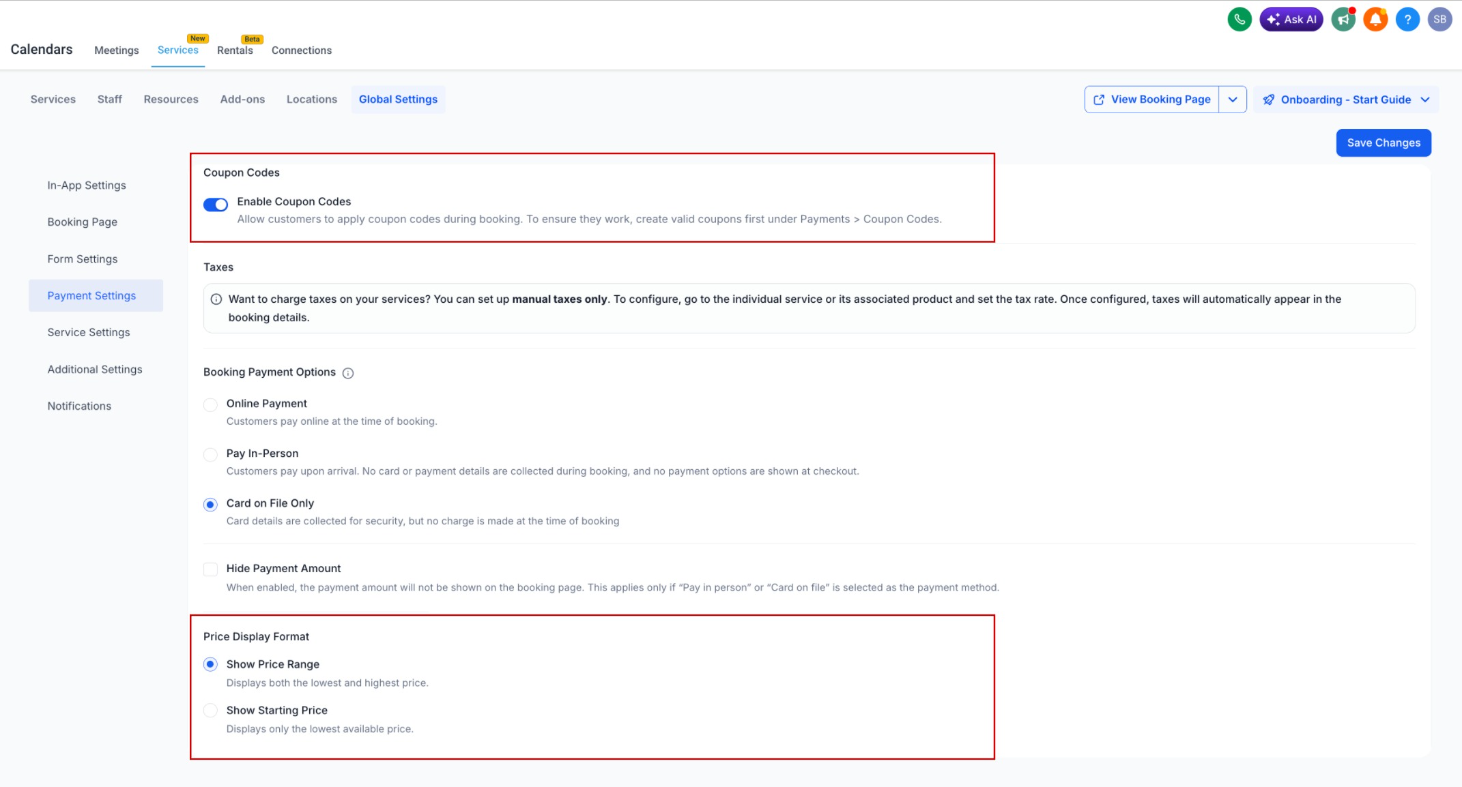
Coupon Visibility
- Choose to enable or disable coupon codeson the booking page
- When disabled, the coupon field is completely hidden
Price Display Format
- Fixed range— shows full price range (existing behavior)
- From $X— shows thelowest starting price
- Final price is calculated after selecting variations or add-ons
---
How to use
- Go to Calendars
- Click Services
- Open Global Settings
- Navigate to Payment Settings
- Configure: Toggle Enable Coupon Codesand/or SelectPrice Display Format
- Click Save Changes
---
Why this matters
- More controlover your booking page experience
- Simpler pricing displayfor better customer clarity
- Flexible pricing presentationbased on your business needs
- Cleaner booking flowwith fewer distractions
Was this article helpful?
That’s Great!
Thank you for your feedback
Sorry! We couldn't be helpful
Thank you for your feedback
Feedback sent
We appreciate your effort and will try to fix the article